Crosstalk PBX: a small business PBX, in your office or hosted
Crosstalk PBX is a fully featured phone system for small and mid-sized businesses, built and supported by our team. We run it on a Crosstalk server in your office, or we host it for you. Either way, you own your phones, you get every feature without per-user licensing, and we make the move to your new phone system as painless as possible. We ship everything to your office and set it up remotely, anywhere in the U.S. and Canada.
Three simple steps
- 1 Choose your PBX serverOn-premises or hosted
- 2 Pick your phonesCrosstalk, cordless, conference and more
- 3 Pick your maintenance planUpdates, backups, changes and support
We'll help you with every one of these decisions in a free consultation.
Choose your PBX server
It's the same fully featured PBX system either way. The question is where you want the server to live.
On-premises server
From $749 for the Crosstalk 720

On-premises servers give you the most control over your phone system, and they open up hardware options for copper phone lines (POTS), PRIs and other legacy equipment. We have servers for any size deployment, from a 10-person office to a large contact center.
Crosstalk 720
$749
Up to 100 phones and 30 calls at once. Compact, fanless desktop unit.
Rack-mount servers
Up to 2,000
phones and 350 calls at once, with room for analog and PRI cards.
Every Crosstalk server ships ready to go with the System Admin Pro module included, and a 2-year warranty that can be extended to 5 years.
Shop PBX servers →Hosted server
From $49 per month, added to your maintenance plan
Hosting is the best fit for offices that don't want hardware to maintain, and for multi-site organizations that want every location on one phone system. Hosted servers are quick to deploy, and they take the worry out of administration and backups.
Basic Hosting
$49/mo
Up to 50 phones.
Premium Hosting
$99/mo
Up to 100 phones. Adds the Endpoint Manager module for central phone provisioning, kept patched under your plan.
Offsite backups and updates are covered by your maintenance plan. More than 100 phones? We'll build a custom hosted server for you.
Price a hosted system →Pick your phones
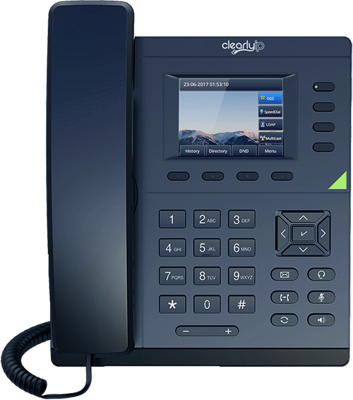
Crosstalk PBX works with any standard SIP phone. We break our lineup into four groups to make it easier to decide what each person needs. All Crosstalk phones are solidly built, come with a 2-year warranty, and show your logo on the screen.
Desk Phones for Business
Crosstalk 230, Crosstalk 250, Crosstalk 270, and more
See the guide →
Receptionist & Power User Phones
Crosstalk 270, Crosstalk 280, Crosstalk 291 Plus, and more
See the guide →
Cordless, DECT & Wi-Fi Phones for Business
Crosstalk 291 Plus, Snom M100 KLE, Snom M10R KLE Ruggedized DECT Handset, and more
See the guide →
Conference Phones, Paging & Intercoms
Yealink CP925, Snom C620, Algo 8301, and more
See the guide →Pick your maintenance plan
Crosstalk takes the worry out of maintaining and securing your phone system. Every plan keeps your PBX updated and backed up offsite, and your PBX's alerts come straight into our ticketing system. The Standard and Premium plans add the things most businesses need month to month: changes to your system, and time for us to fix things when they break. We recommend Basic for systems under 50 phones and Standard for 50 phones or more.
Changes vs. troubleshooting
A change is something you want done differently: add a user, edit a ring group or menu, set holiday hours.
Troubleshooting is fixing something that's broken: bad call quality, phones that won't register, a carrier outage, failed hardware.
| Recommended under 50 phones Basic $129/mo | Recommended for 50+ phones Standard $299/mo | Premium $399/mo | |
|---|---|---|---|
| Monthly operating system and phone system updates | |||
| Automated offsite backups (3 weekly + 3 monthly) | |||
| Alert monitoring (your PBX alerts open a ticket with us) | |||
| Email setup for voicemail and notifications (SMTP relay) | |||
| Email and phone support | |||
| Priority support queue | – | ||
| Changes (moves, adds, changes and deletes) per month | – | 5 | 10 |
| Troubleshooting time per month (rolls over for a year) | – | 30 min | 1 hour |
| Annual PBX review, including holiday hours | – | ||
| Quarterly security checkup | – | – |
Add-ons: hosting ($49 or $99/mo), a warm spare server kept ready to swap in for on-premises systems ($49/mo), and 25% off each additional site. Work beyond your plan is billed at our hourly rate. Download the maintenance plan PDF.
Crosstalk PBX cost calculator
Our pricing is 100% transparent. Build your system below and you'll see exactly what it costs up front and every month. We highly encourage you to get a quote from RingCentral or 8x8 and compare! (Here's how we compare to RingCentral.)
1. Where should your PBX run?
2. Pick your phones
We've started you with a typical 10-person office. Change the numbers to match yours.
Desk phones
2-year warranty includedCordless phones
Conference phones
Softphones
3. Your server
4. Your maintenance plan
We recommend Basic for systems under 50 phones and Standard for 50 or more. Compare the plans to see exactly what each one includes.
Example: a 10-phone office
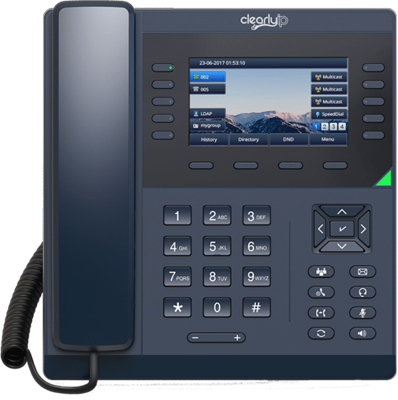
One Crosstalk 270 for the front desk and nine Crosstalk 230s, on the Basic maintenance plan. 10 phones is exactly what the $2,400 setup covers.
What's in it
 1x
Crosstalk 270
Front desk
9x Crosstalk 230
Everyone else
Full setup
Design, config and testing

On-premises
- Up front
- $4,703.40
- Monthly
- $129
- Total over 3 years
- $9,347.40
Includes the Crosstalk 720 with the warranty extended to 5 years. Phone service from your carrier is extra.
Hosted
- Up front
- $3,857.40
- Monthly
- $178
- Total over 3 years
- $10,265.40
Includes Basic PBX Hosting. Phone service from your carrier is extra.
What's included in setup
- Everything shipped straight to your office, then set up and tested remotely
- Best practice design consultation
- Server built, configured and tested
- Every phone configured and tested
- SIP trunk, copper line (POTS) or PRI connection set up and tested
- Kari's Law and RAY BAUM'S Act compliant E911
- Phone number porting assistance
- Administrator training session
- User guides for your phones and features
- 30 days of support after go-live
Crosstalk PBX features
- Auto attendant (IVR) and time-based call routing
- Unlimited inbound and outbound routes
- Ring groups and call queues
- Voicemail to email
- Call recording and detailed call records
- Unlimited conference bridges
- Paging and intercom
- Follow me / forward to cell phone
- Custom music on hold
- Transfer, park and 3-way calling
And much more. Add-on modules are available if you need them.
Crosstalk PBX FAQs
Do I need a maintenance plan?
Technically, no. In practice, every system we install should have one. A phone system is a server connected to the internet, and FreePBX gets regular security patches. In August 2025, attackers began exploiting a flaw in FreePBX's commercial Endpoint Manager module and it was serious enough to be added to the U.S. government's list of actively exploited vulnerabilities. The systems at risk were the ones that hadn't been patched or had their admin page open to the internet. We can also take the admin page off the internet entirely.
The maintenance plan is how your system stays patched, backed up and monitored. Without one, any work we do is billed by the hour.
What counts as a "change" (MACD)?
MACD stands for moves, adds, changes and deletes. It's a quick configuration change to how your system works, usually about 15 minutes or less. For example: adding or removing a user, changing who rings in a ring group, editing your auto attendant menu, setting holiday hours, resetting a voicemail PIN, or renaming a phone.
Bigger projects, like adding a new office or redesigning your whole call flow, are quoted separately.
What's the difference between a change and troubleshooting time?
A change is something you want done differently. Troubleshooting is fixing something that's broken: choppy call quality, a carrier outage, phones that won't register, failed hardware, or a firewall problem. The Standard and Premium plans include troubleshooting time every month, and any unused time rolls over for up to a year. Work beyond your plan is billed at our hourly rate.
Where does my phone service come from?
Crosstalk PBX connects to a SIP trunk, which is internet phone service from a carrier. You pay the carrier directly, and we recommend ClearlyIP SIP trunking. VoIP.ms is another good option. With an on-premises system, we can also connect copper phone lines (POTS) or a PRI from your phone company. A hosted system can use them too through an analog gateway, but we don't usually recommend it.
What happens if our internet goes down?
It depends on where your phone system lives.
On-premises: your server and phones are on the same local network, so calls between extensions keep working. Outside calls need your internet connection, or copper lines if you have them.
Hosted: the server keeps answering your calls. The phones at the office that lost internet go offline until it comes back, and in the meantime calls can go to voicemail or be forwarded to another number, like a cell phone. With multiple locations, only the affected site's phones go offline, and calls to that site can be redirected to locations that still have internet.
For mission-critical phone systems, we recommend a multi-WAN setup: two internet connections, ideally from different providers, with automatic failover. We can set that up for you. If it grows into a bigger network design project, that part is quoted separately.
Can I use phones I already have?
Crosstalk PBX works with any standard SIP phone. Contact us with the make and model and we'll let you know whether it's a good fit.
What happens to my phones if we ever change phone systems?
They go with you. You own your phones, and they're standard SIP phones, so they can be moved to a different phone system in the future.
Can I connect a fax machine, paging system or door phone?
Yes! See our conference phones, paging and intercoms guide for the adapters, paging gear and intercoms we use.
Do you have Crosstalk PBX packages for multiple offices?
Yes. A hosted system works especially well for multiple locations, since every office connects to the same server. Maintenance plans for additional sites get a 25% discount per site.
What software does Crosstalk PBX run on?
Crosstalk PBX runs on FreePBX, a widely used open source phone system built on the Asterisk PBX engine. It does everything the big-name phone systems do, without per-user licensing, which is why we build on it. Commercial modules are available for anything extra, and every Crosstalk PBX server includes the System Admin Pro module.
Already running FreePBX? See FreePBX support.
Make it easy with Crosstalk
Contact us today for a free consultation. We'll help you choose your server, your phones and your plan.