Whale LAN was the LAN party inside LTX 2023, sponsored by Ubiquiti. Hundreds of people brought their gaming computers and played for two days straight, and Linus Media Group built a network for it that was overkill in the best way. I mapped out the whole thing, and below is the network diagram, a walkthrough of each piece, and what Jake Tivy from LMG told me about building it.
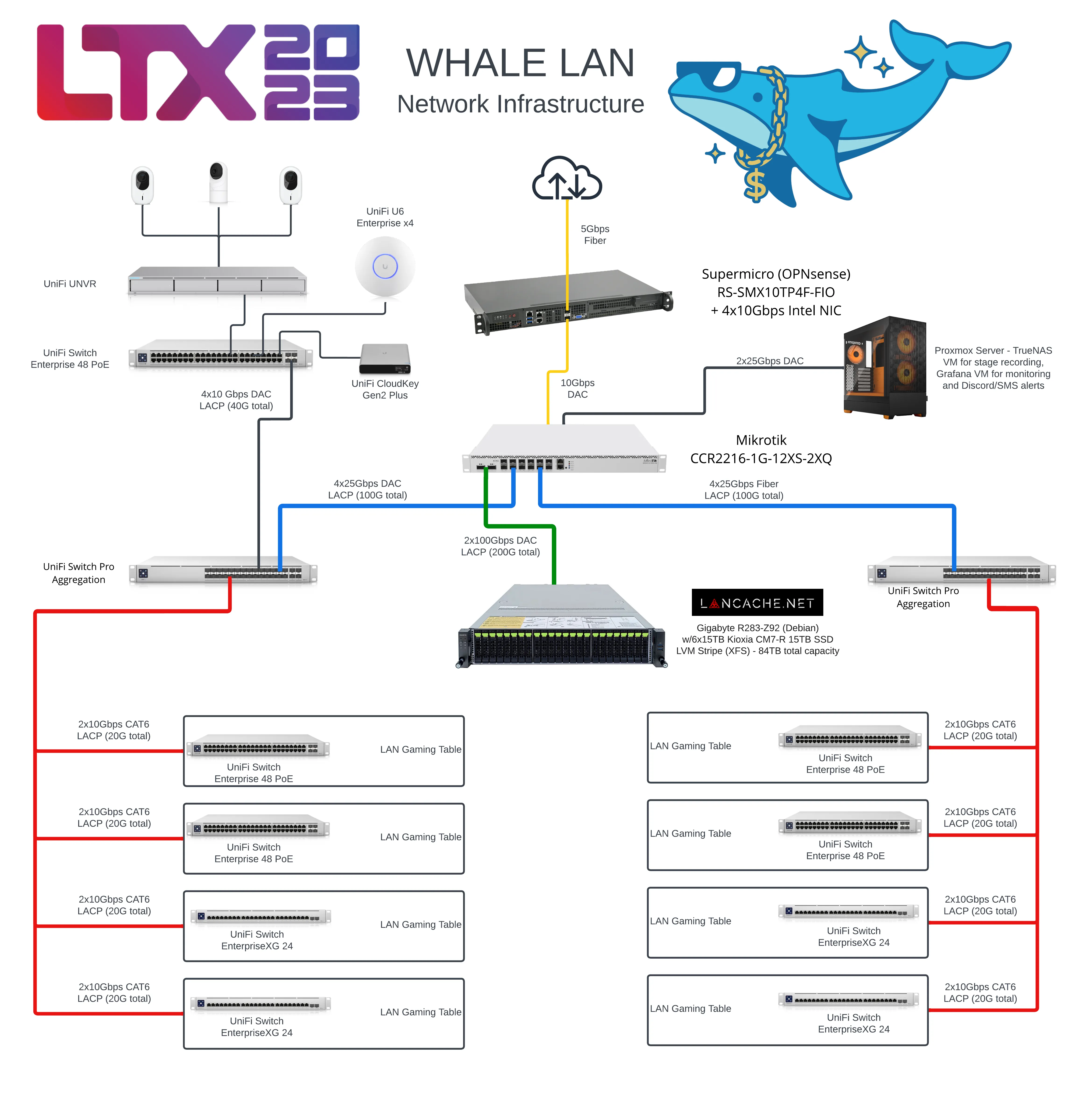
Download the Whale LAN network diagram (PDF)
Internet and firewall
The convention center gave LMG a 5 Gbps fiber connection. It terminated in a 1U Supermicro server (RS-SMX10TP4F-FIO) with a four-port 10 Gbps Intel network card, running OPNsense as the firewall. A 10 Gbps DAC cable connected the firewall to the core.
The core: MikroTik CCR2216
The core router was a MikroTik Cloud Core Router CCR2216-1G-12XS-2XQ. It has a 16-core CPU plus a Marvell Prestera switch chip for layer 3 hardware offloading, two 100 Gbps QSFP28 ports and twelve 25 Gbps SFP28 ports. Every major link in the network starts here.
The 200 Gbps Lancache server
Both 100 Gbps ports on the MikroTik were link-aggregated (LACP) into a single 200 Gbps connection to the Lancache server:
| Part | Spec |
|---|---|
| Chassis | Gigabyte R283-Z92 |
| CPUs | Dual 32-core AMD EPYC (Genoa) |
| Memory | 1.5 TB DDR5 |
| Storage | Six 15 TB Kioxia CM7-R Gen 5 NVMe drives, LVM stripe with XFS, 84 TB usable |
| Software | Debian with Lancache |
Lancache lets each game or update download from the internet once and then serve every player from the LAN. The team pre-filled about 32 TB of games from Steam, Battle.net and Epic before the event, and about a quarter of that was Windows updates. Jake said that surprised him until he realized how many people bring a laptop that hasn’t been turned on in a month. Another 1.5 TB was cached during the event.
The payoff showed on the internet link. Out of 5 Gbps, usage peaked at about 2.1 Gbps, and those peaks were mostly people running speed tests.
Jake started out with ZFS on the cache but hit a ceiling around 80 Gbps, because serving a cache to hundreds of clients is a very random workload. Switching to an LVM stripe with XFS fixed it. In testing, the cache pulled well over 200 Gbps locally, and it served 200 Gbps over the network to two Proxmox VMs, then 300 Gbps with a third server added.
UniFi switching to every table
From the core, the network split into two UniFi Switch Pro Aggregation switches, one for each side of the hall. Each one connected to the MikroTik with four 25 Gbps links in LACP, for 100 Gbps per side. The near side used DAC cables. The far side used indoor single-mode mini-armored fiber from Infinite Cables, which wraps the fiber in a flexible metal jacket so it survives being walked on and rolled over.
Each gaming table got two 10 Gbps Cat6 links in LACP (20 Gbps per table) to either a UniFi Switch Enterprise 48 PoE or a UniFi Switch EnterpriseXG 24. That gave every player at least a 2.5 Gbps port, and the EnterpriseXG tables gave everyone 10 Gbps.
The admin side hung off a UniFi Switch Enterprise 48 PoE connected with four 10 Gbps DAC links (40 Gbps). It ran the admin stations, a UniFi UNVR with cameras, U6 Enterprise access points, and a Cloud Key Gen2 Plus as the UniFi Network controller.
Monitoring and recording
Next to the rack was a Proxmox server in a Fractal Design Pop Air case: an AMD EPYC 7543P, 256 GB of DDR4 and four Kioxia CD6 Gen 4 NVMe drives. It connected to the core with two 25 Gbps links and ran a Grafana VM for monitoring, with alerts sent to Discord and by SMS, and a TrueNAS VM for recordings from the Whale LAN stage.
What Jake would change
According to Jake, the network had almost no problems once players arrived, and the first hour of a LAN party is usually when things break. The trouble was in setup, with the 10 Gbps RJ45-to-SFP+ transceivers on the Cat6 runs. Some worked on one cable and not another, especially on longer runs. He’d run fiber to every table next time. He’d held off because he worried volunteers would damage it during setup, but LANfest Colorado has run fiber to its tables for five or six years without problems.
Teardown was the other surprise. Whale LAN sat in front of the main loading door, so nobody else could load out until it was gone. The team went from internet off at 6 p.m. to pallets loaded in about two hours, with every cable wrapped and the UniFi switches dropped into Rubbermaid bins that happened to be exactly the right height.
What a business network can take from it
Most offices will never need 200 Gbps, but the design choices carry over. Link aggregation gives you more bandwidth and a spare path between switches. Fiber is more reliable than copper SFP+ adapters on long runs. Alerts that reach a person’s phone mean you hear about a problem before your users do. These are the same calls we make when we design business networks and manage them for our clients.